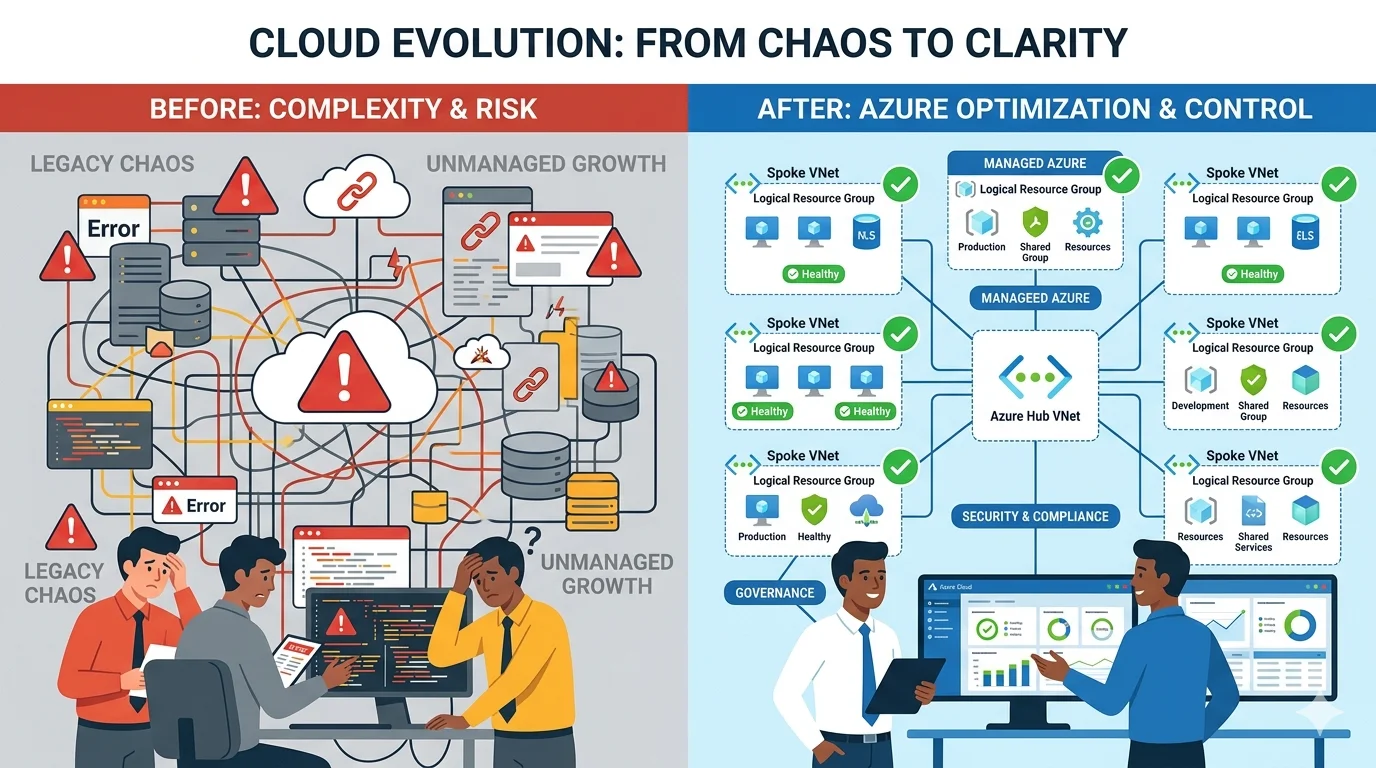
The Cost of Getting the Foundation Wrong
- VNet address space designed too small requires a full network redesign to fix, which means destroying and recreating every resource that depends on it
- State files structured incorrectly in early stages create blast radius problems that are painful to untangle without downtime
- Module boundaries drawn in the wrong place produce coupling that makes isolated changes impossible without touching unrelated resources
- Naming conventions established inconsistently in early resources are almost impossible to standardize later without resource recreation
- RBAC assignments designed too broadly in early stages create security debt that is politically difficult to tighten once teams are accustomed to their permissions
- Private endpoint architecture added retrospectively to a platform designed for public access requires rebuilding networking and reconfiguring every dependent service
What the Design Document Must Cover
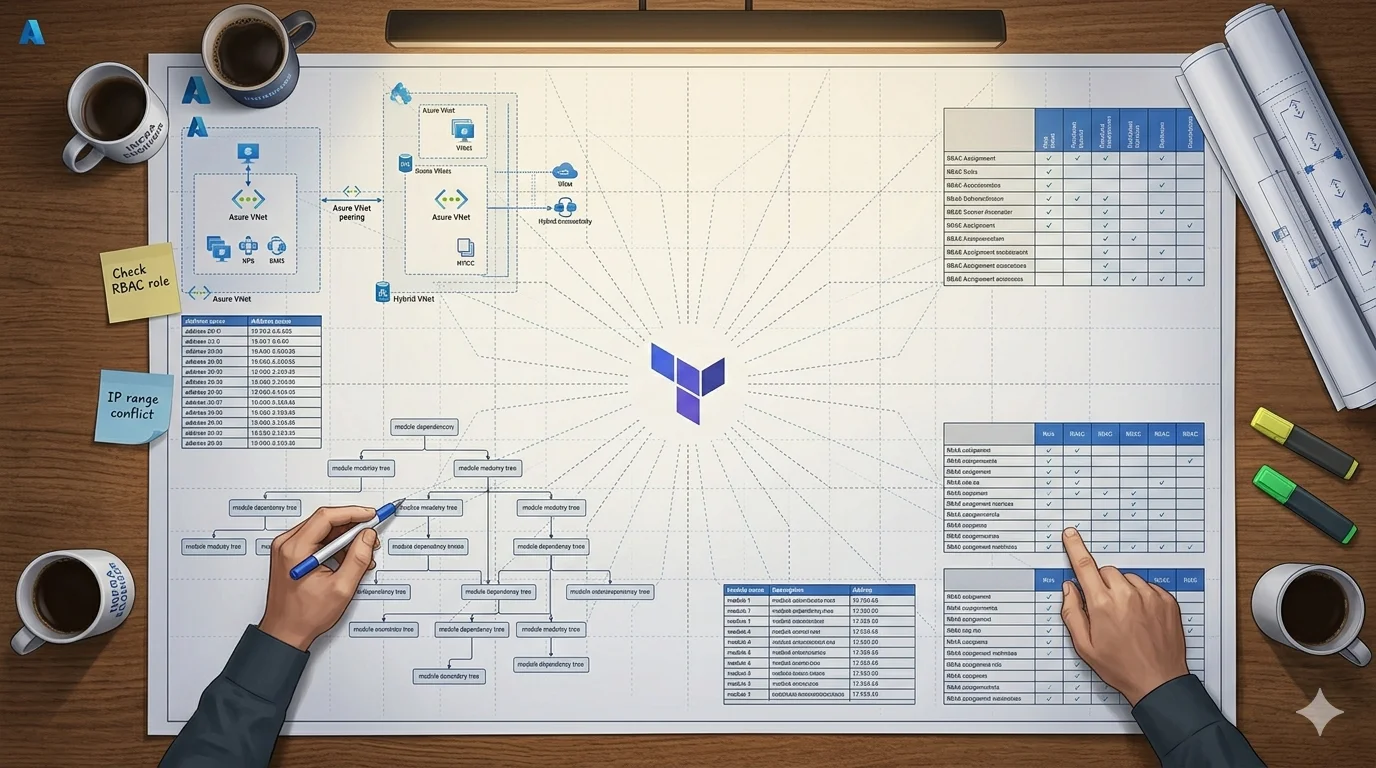
- Complete address space plan for every VNet and subnet across every environment including room for growth
- Resource naming convention with character limit compliance verified for every resource type
- Tagging strategy with mandatory tags defined and ownership of each tag documented
- Module boundary decisions with explicit statements about what logic belongs where
- Remote state structure including storage account layout, container naming and locking strategy
- RBAC assignment plan covering every identity and every scope it needs access to
- Private endpoint and private DNS zone requirements for every PaaS service in scope
- Environment promotion strategy covering how code moves from development through to production
- Secret management approach covering where secrets live and how services access them at runtime
- Dependency map showing which resources must exist before others can be provisioned
The Naming Convention Problem Nobody Takes Seriously Enough
I want to spend more time on naming conventions than most posts do because in my experience this is consistently underestimated in the planning phase and consistently regretted in the operational phase.
Azure has wildly inconsistent character limits across resource types. A virtual network allows up to 80 characters. A storage account allows a maximum of 24 characters and prohibits hyphens. A Key Vault is limited to 24 characters. A container registry name must be globally unique, alphanumeric only and between 5 and 50 characters. Any naming convention that works for a virtual network may be impossible to apply to a storage account without truncation that destroys its descriptive value.
The consequence of not resolving this upfront is that you end up with two categories of resource names in your environment. Resources where the full convention could be applied and resources where it had to be abbreviated or altered because it hit a character limit. That inconsistency is visible in the portal, in monitoring tools, in cost management views and in audit logs forever.
A naming pattern that works across Azure resource types
- Structure: resource-type-prefix + workload + environment-short-code + region-short-code + optional-numeric-suffix
- Example for resources with hyphens allowed: vnet-platform-prd-uks, kv-platform-prd-uks, aks-platform-prd-uks
- Example for storage accounts with no hyphens and 24 character limit: stplatformprd001
- Keep environment short codes to three characters maximum: dev, qa, uat, stg, prd
- Keep region short codes to three characters maximum: uks for UK South, ukw for UK West, eus for East US
- Validate every resource type in your scope against the naming pattern before finalising it
- Document the complete list of resource type prefixes in the design document so every engineer uses the same ones
- Never use full words where abbreviations exist and are unambiguous
Address Space Planning That Survives the Future
Address space planning for a greenfield environment has to account for requirements that do not exist yet. This sounds paradoxical but it is the practical reality of infrastructure design. The organization that tells you they only need one VNet today will in two years need to peer that VNet to a new acquisition, connect it to an on-premise network through ExpressRoute and potentially peer to a partner organization's Azure environment. If the address space you designed is overlapping with any of those future networks you have a conflict that is very expensive to resolve.
The safest approach is to allocate a dedicated private address range per environment that is non-overlapping not just internally but within the context of the broader organization's network addressing scheme. Work with the network team to understand what ranges are already in use on-premise and in any existing cloud environments before you design your ranges. Then design your ranges to be non-overlapping with current use and leave room for growth without requiring renumbering.
A practical address space structure for a four environment platform
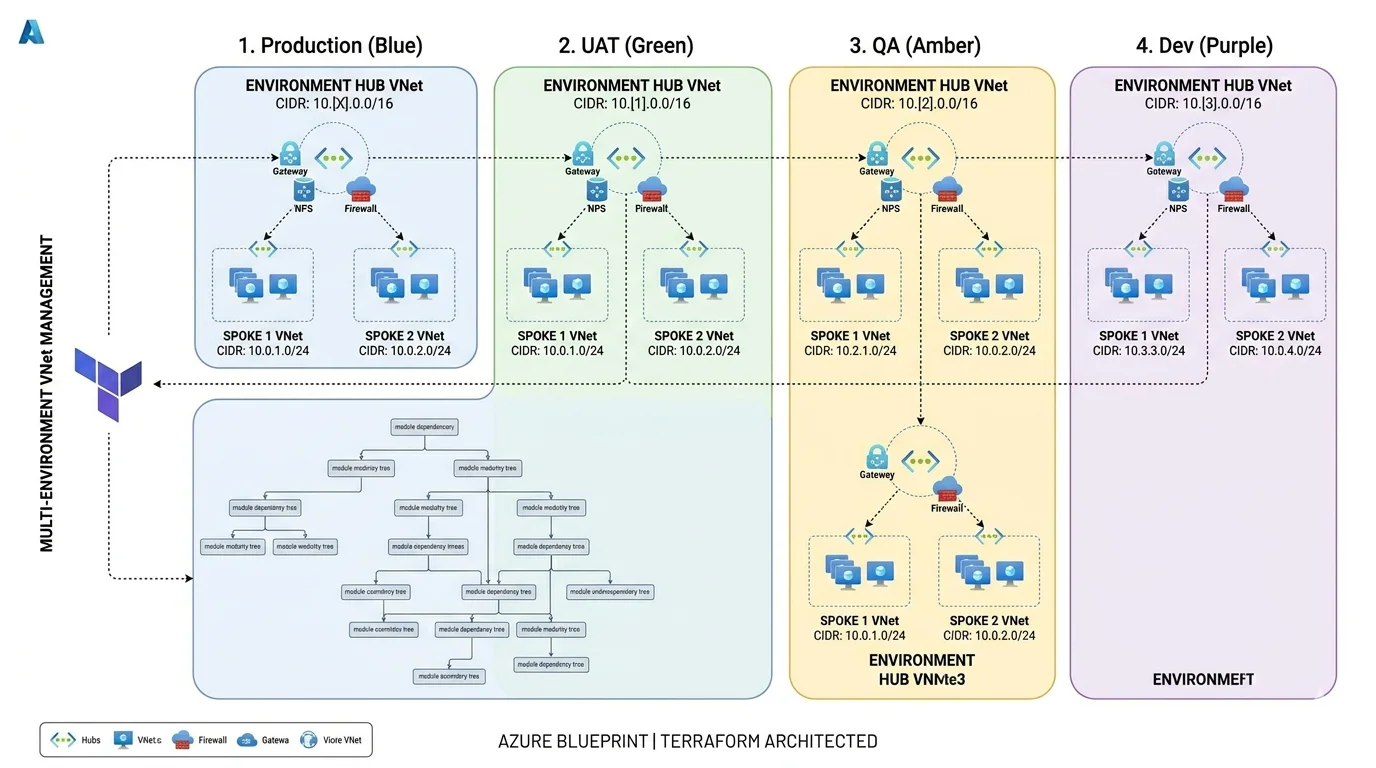
- Production primary: 10.0.0.0/16 giving 65,536 addresses across production workloads
- Production secondary for DR: 10.1.0.0/16 keeping secondary non-overlapping with primary
- UAT: 10.2.0.0/16 sized identically to production to enable accurate load testing
- QA: 10.3.0.0/16 with identical structure for consistent environment parity
- Development: 10.4.0.0/16 with flexibility for experimental subnets
- Hub VNet per environment takes the first /24 of its range for shared services
- Each spoke VNet takes a /24 from the second block onwards within the environment range
- Subnets within spokes are /25 or /26 depending on the workload scale requirement
- Leave at least 50 percent of each environment range unallocated for future spoke additions
Structuring Your Terraform Repository
The Terraform repository structure is the decision that has the longest lasting consequences and the one I have seen debated most intensely among senior engineers. There is no universally correct answer but there are answers that are clearly wrong for certain contexts and I have a strong opinion about what works at enterprise scale based on having operated in environments where different approaches were in use.
The three main approaches are Terraform Workspaces, Terragrunt with separate state per environment and separate root modules per environment. I have used all three in production.
Terraform Workspaces
- Single module definition with workspace-specific variable overrides
- Simplest to set up initially requiring minimal repository structure
- Workspaces share a backend configuration making the separation feel artificial
- Engineers must explicitly select the correct workspace before every operation
- Applying in the wrong workspace is a persistent and serious operational risk
- Works adequately for simple configurations with minimal environment differences
- Becomes increasingly difficult to manage as environments diverge in their requirements
- Not recommended for enterprise environments where production blast radius is a serious concern
- DRY approach eliminates duplication of backend and provider configuration
- Separate state file per environment enforced by the tool rather than by convention
- Dependency management between modules is explicit and machine enforced
- Requires engineers to learn Terragrunt in addition to Terraform
- Adds a tool dependency that must be versioned and maintained
- Excellent choice for organizations with strong Terraform maturity and willingness to invest in the toolchain
- The HCL configuration files at the root of each environment directory are clean and minimal
- My preferred approach when the team has the maturity to use it well
Separate root modules per environment
- Each environment has its own directory containing its own backend configuration and variable file
- Running terraform apply from inside a directory can only ever affect that environment
- The blast radius of a mistake is contained by the directory structure itself
- No additional tooling required beyond Terraform itself
- Engineers inheriting the codebase can understand the structure without learning new tools
- Some duplication of backend and provider configuration across environment directories
- My recommendation for organizations prioritizing clarity and safety over elegance
- The approach I use on greenfield projects where the receiving team may not have deep Terraform maturity
Remote State: The Foundation of Everything Else
Remote state is not optional for any serious Terraform deployment. Local state files are appropriate for learning exercises and nothing else. In a team environment with multiple engineers and a CI/CD pipeline running Terraform, local state files lead to state corruption, lost resources and the kind of infrastructure incident that ends careers.
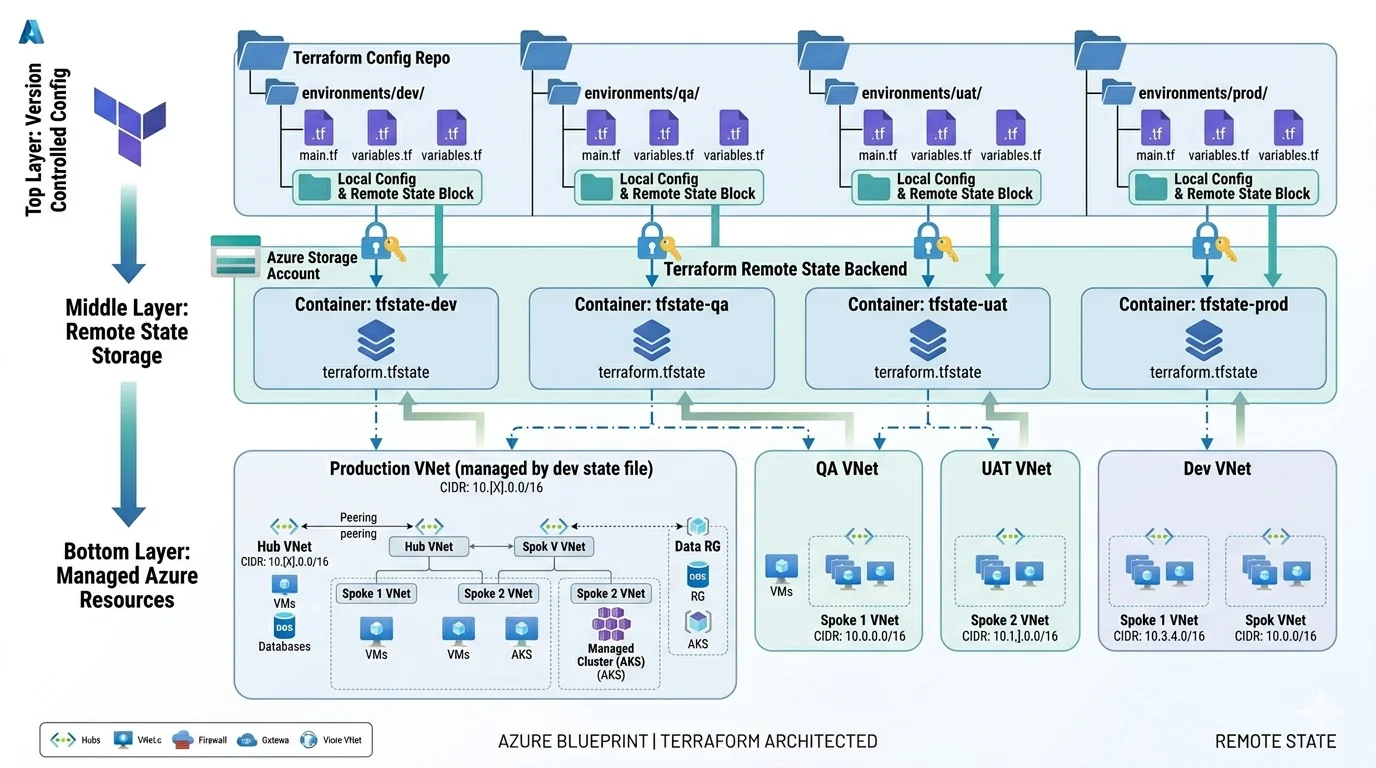
The Azure native remote state backend uses Azure Blob Storage for state file storage and Azure Blob lease-based locking to prevent concurrent operations on the same state file. The setup is straightforward but the organizational structure around it requires deliberate thought.
Remote state organizational structure
- Store state in a dedicated management subscription or resource group isolated from workload subscriptions
- Use a separate storage account container per environment to prevent cross-environment state access
- Use a separate state key per module within each environment for granular blast radius control
- Enable storage account versioning so accidental state corruption can be recovered from a previous version
- Enable soft delete on the storage account with a meaningful retention period
- Restrict access to the state storage account using Azure RBAC with minimum required permissions
- Grant the pipeline service principal Storage Blob Data Contributor scoped to the specific containers it needs
- Grant engineers Storage Blob Data Reader for inspection and debugging without write access
- Never allow engineers to modify state files directly outside of Terraform operations
- Enable diagnostic logging on the state storage account to audit all access attempts
Module Design: Where Most Teams Get It Wrong
Module design is the aspect of Terraform architecture that has the most impact on long term maintainability and the most variation in how teams approach it. I have seen two failure modes that are roughly equally common and equally damaging in different ways.
The first failure mode is no modules at all. Everything in a single root module with hundreds of resources defined inline. This works until it does not and then it fails catastrophically because a single plan touches everything and a single apply error can leave you halfway through a change with no clean path forward.
The second failure mode is over-modularization. A module for every individual resource, nested three levels deep, with so many input variables and output values that understanding what any given module does requires reading five files simultaneously. This creates the illusion of good structure while making the code harder to understand and maintain than a flat configuration would be.
The principle I use for module boundary decisions is that a module should represent a cohesive piece of infrastructure that is always deployed together, always has the same lifecycle and makes sense as a named concept to the people operating the platform.
Modules that make sense as cohesive concepts
- hub-network: VNet, subnets, NSGs, Azure Firewall, Bastion, route tables and VNet peering for the hub
- spoke-network: Spoke VNet, subnets, NSGs, route table associations and peering to the hub
- private-dns: All private DNS zones and their VNet links grouped by service category
- aks-cluster: AKS cluster, node pools, managed identity, RBAC assignments and diagnostic settings
- container-registry: ACR, private endpoint, DNS group and RBAC assignments together
- key-vault: Key Vault, private endpoint, DNS group, RBAC assignments and access policies together
- monitoring: Log Analytics Workspace, Application Insights, diagnostic settings and alert rules
- build-agents: VMSS, network interface, managed identity, custom script extension and NSG rules
The Pipeline That Runs Your Terraform
The Terraform itself is only half of the infrastructure as code story. The pipeline that runs it is equally important and equally deserving of deliberate design. A Terraform codebase with well structured modules and clean state management that is executed manually by engineers with local credentials is still an infrastructure as code implementation with serious gaps in auditability, consistency and safety.
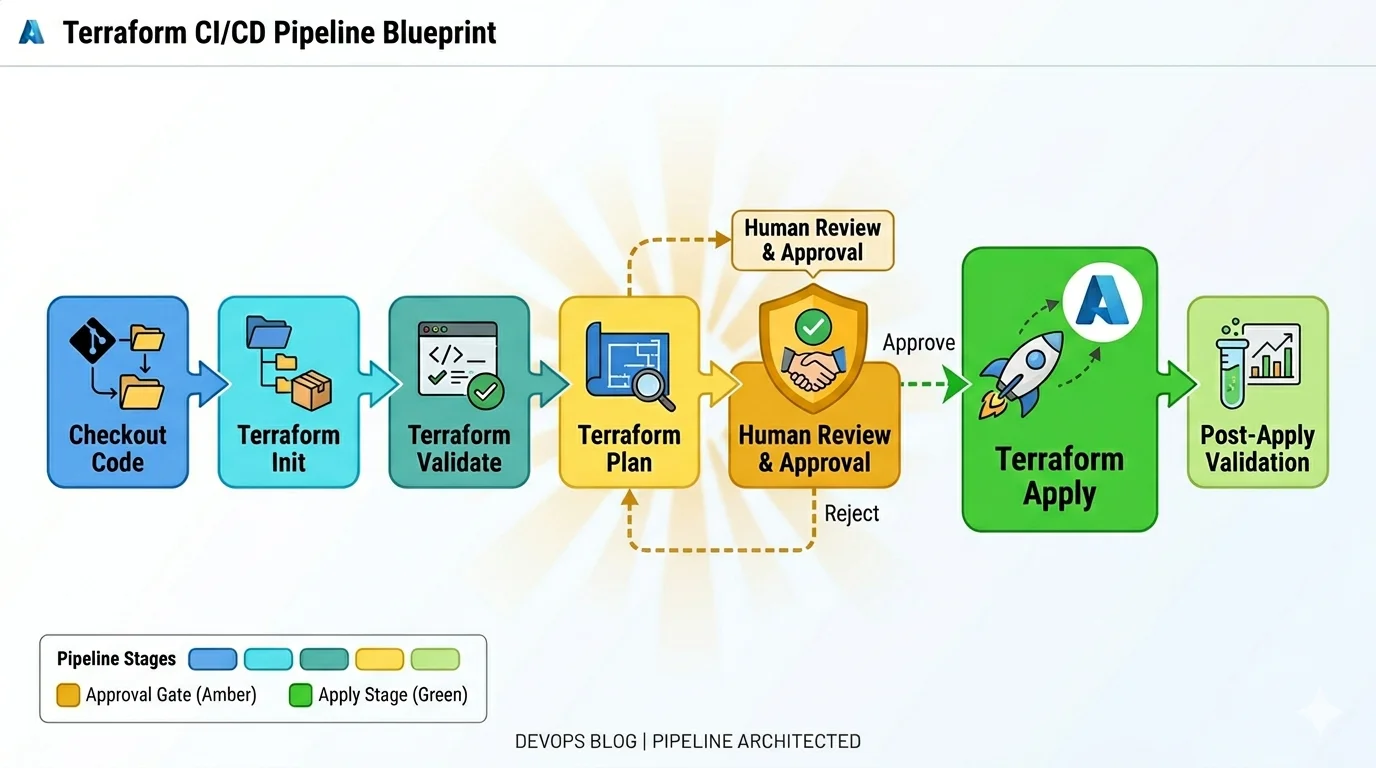
Every Terraform operation in a production environment should run through a pipeline. The pipeline enforces consistency in how Terraform is initialized, which version is used, how authentication is handled and what approvals are required before apply. Consistency in these things is what gives the team confidence that a plan output accurately predicts what apply will do, which is the foundational assumption that makes Terraform safe to operate.
What the Terraform pipeline must enforce
- Pinned Terraform version specified in a required_version constraint and installed consistently by the pipeline
- Pinned provider versions specified in required_providers with pessimistic constraint operators
- OIDC federation for authentication to Azure with no client secrets stored in the pipeline
- Terraform validate running before plan to catch syntax errors before they produce a confusing plan output
- Plan output published as a pipeline artifact and presented in a readable format for human review
- Manual approval gate between plan and apply for UAT and production environments
- Apply using the saved plan file rather than re-running plan to prevent plan-apply discrepancy
- Post-apply validation step confirming key resources exist and are in the expected state
- Drift detection run on a schedule comparing actual Azure state to the Terraform state file
- Notification on apply failure with enough context to start investigating without opening four dashboards
Hub and Spoke: Why Every Enterprise Azure Platform Should Use It
The Hub and Spoke network topology is the standard enterprise Azure network architecture for good reason. It is not the only valid topology but for organizations with multiple workloads, multiple environments and a need for centralized security controls it is the right default and the one I implement on every greenfield enterprise platform.
The core principle is simple. Shared security services and connectivity resources sit in a central hub VNet. Workload environments sit in spoke VNets. All traffic between spokes flows through the hub rather than directly between spokes, which means the hub is the chokepoint where inspection, logging and policy enforcement happens. No traffic enters or leaves a spoke without the hub knowing about it.
What belongs in the hub
- Azure Firewall for centralized outbound traffic inspection and control
- Azure Bastion for secure administrative access to VMs without public IP addresses
- VPN Gateway or ExpressRoute Gateway for on-premise connectivity
- Azure Firewall Policy with rule collections covering permitted outbound destinations
- Hub VNet with dedicated subnets for each service including the mandatory AzureFirewallSubnet and AzureBastionSubnet
- Shared private DNS zones linked to all spoke VNets for consistent PaaS resolution
- Network monitoring through NSG flow logs and Azure Firewall diagnostic logs to Log Analytics
What belongs in spokes
- Workload specific subnets sized for the resources they will contain
- NSGs per subnet with rules specific to that subnet's traffic profile
- Route tables with a default route pointing all traffic to the hub Azure Firewall
- Private endpoints for PaaS services used by that spoke's workloads
- AKS node pool subnets, application subnets, private endpoint subnets separated by function
- No direct internet access from spoke subnets, all outbound through the hub firewall
Private Endpoints: Design Them In From the Start
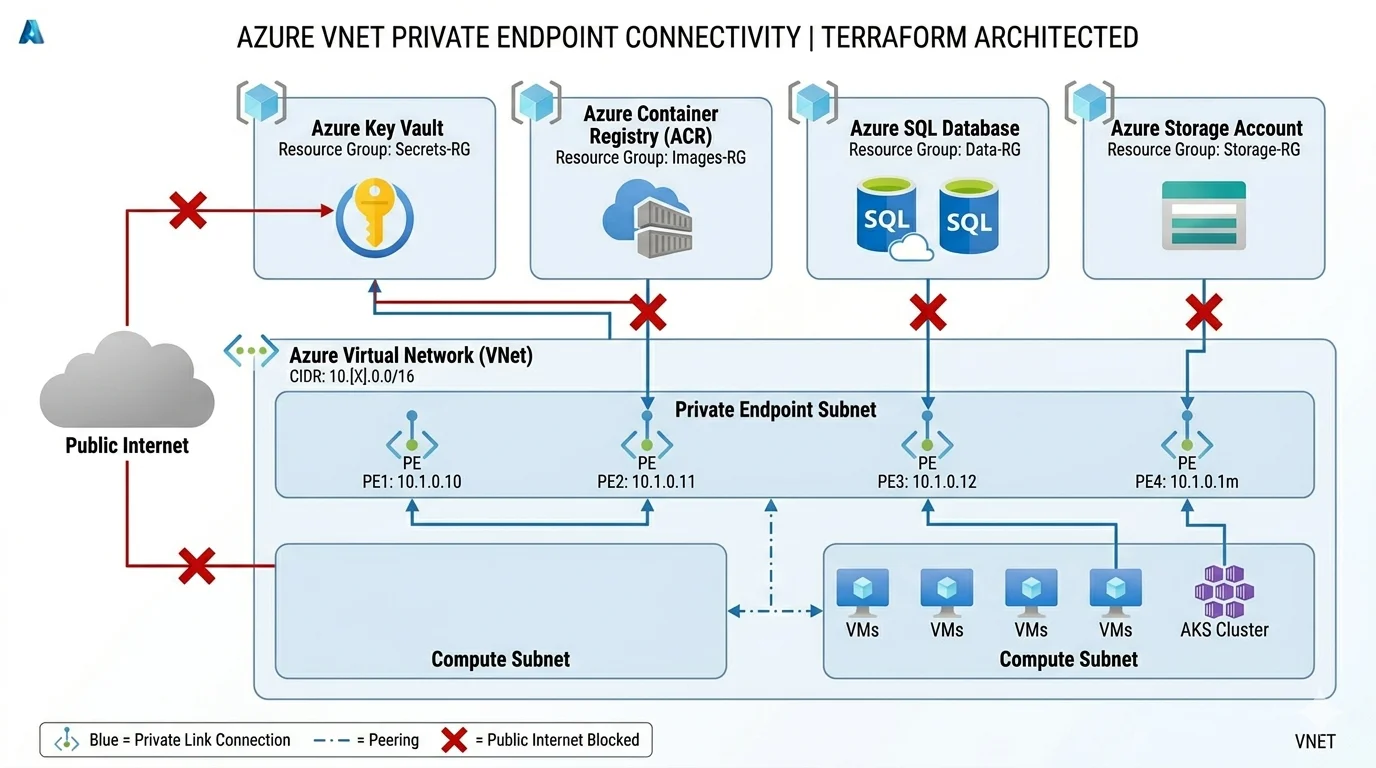
Private endpoints are the mechanism for connecting Azure PaaS services, Key Vault, Storage, SQL, Container Registry, AKS API server and many others, to your private VNet so they are reachable only from within the network rather than from the public internet. Designing private endpoints in from the start is fundamentally different from adding them retrospectively and the difference in effort is significant enough that I want to make this point explicitly.
Adding private endpoints to a service that was originally deployed with public access requires updating the service configuration to disable public access, creating the private endpoint in the right subnet, creating the private DNS zone if it does not already exist, linking the zone to the VNet, and verifying that all existing clients that were connecting through the public endpoint now resolve to the private endpoint correctly. In a production environment that existing clients depend on this is a change with real downtime risk if anything in that sequence goes wrong.
In a greenfield Terraform deployment you create the service with public access disabled from the first apply, create the private endpoint at the same time, group them in the same module so they are always deployed together, and the platform is private from the first moment it exists. That is the only moment when private-first costs nothing.
Private DNS zones required per Azure service
- Azure Container Registry: privatelink.azurecr.io
- Azure Key Vault: privatelink.vaultcore.azure.net
- Azure Storage blob: privatelink.blob.core.windows.net
- Azure Storage DFS for ADLS Gen2: privatelink.dfs.core.windows.net
- Azure SQL Database: privatelink.database.windows.net
- Azure Kubernetes Service API server: managed automatically in node resource group but requires VNet link
- Log Analytics OMS: privatelink.oms.opinsights.azure.com
- Log Analytics ODS: privatelink.ods.opinsights.azure.com
- Azure Monitor: privatelink.monitor.azure.com
- Azure Automation: privatelink.azure-automation.net
- Azure App Service and Function Apps: privatelink.azurewebsites.net
Identity and Secrets: The Decisions That Affect Everything
The identity and secrets architecture decisions you make in a greenfield build affect every service you provision and every team that operates the platform. Getting these right from the start is significantly easier than retrofitting a proper identity model onto a platform where services have been using shared credentials and broad permissions for months.
The principle I apply consistently is that every service identity should be a Managed Identity rather than a service principal with a client secret wherever Azure supports it, which in a modern Azure environment is almost everywhere. Managed Identities have no credential to store, no expiry to manage and no rotation schedule to maintain. The lifecycle of the identity is tied to the lifecycle of the resource it is assigned to. When the resource is deleted the identity is deleted. There is no orphaned service principal sitting in Entra ID with credentials that were created by someone who left the organization two years ago.
RBAC assignment principles for a greenfield platform
- Assign roles at the narrowest possible scope, resource level preferred over resource group level, resource group over subscription
- Never assign Owner at subscription scope to any non-human identity
- Never assign Contributor at subscription scope when a narrower role achieves the same result
- Use built-in roles wherever they exist rather than custom roles which require ongoing maintenance
- Grant AKS kubelet identity AcrPull on the specific container registry it pulls from, not on the subscription
- Grant pipeline service principal Storage Blob Data Contributor on the specific state containers, not the storage account
- Grant Key Vault Secrets User to service identities that read secrets, not Key Vault Contributor which also allows management operations
- Document every RBAC assignment in the Terraform code with a comment explaining the business reason
- Review RBAC assignments as part of the quarterly access review process from day one, not starting from the first incident
The Handover Problem: Building for the Team That Comes After You
Every greenfield project ends with a handover. Sometimes that handover is to a permanent internal team. Sometimes it is to a different team within the same organization. Sometimes it is to a managed service provider. Regardless of who receives the platform, the quality of that handover is determined almost entirely by how the Terraform codebase was written during the build.
I have received platforms built by other engineers and I have handed over platforms I built myself. The difference between a good handover and a difficult one is not the complexity of the infrastructure. It is whether the code communicates its own intent clearly enough that the receiving team can operate it without needing the original engineers in the room.
What makes a Terraform codebase handover-ready
- Every module has a README explaining what it does, what it requires as inputs and what it produces as outputs
- Non-obvious decisions are documented inline with comments explaining the why not just the what
- Variable files per environment contain only values, not logic, making them readable without Terraform knowledge
- Outputs are named descriptively so their purpose is clear without reading the resource that produced them
- The repository README includes a getting started section covering prerequisites, authentication and first apply sequence
- A bootstrap runbook documents the exact sequence for standing up a brand new environment from scratch
- Terraform version and provider versions are pinned explicitly with a comment explaining when they were last reviewed
- The pipeline configuration includes comments explaining why approval gates exist where they do
- Sensitive decisions like why a particular subnet was sized the way it was are documented rather than left to guesswork
- A known issues section documents current limitations and the reasoning behind accepted compromises
What Good Looks Like After Six Months
The measure of a well built greenfield Terraform platform is not how it looks on day one. It is how it behaves six months after handover when the team operating it has changed, when new requirements have arrived that the original design did not anticipate and when the first significant incident has tested whether the platform is as robust as the design intended it to be.
A well built platform at six months looks like this. New environments can be provisioned by running the documented apply sequence without engineering the original architect to be present. New services can be added to existing environments by writing a new module or extending an existing one without touching unrelated infrastructure. Terraform plan runs show no unexpected drift because nothing has been changed outside of Terraform. Security reviews produce no critical findings because the private endpoint and RBAC foundation held. The team can articulate why every major decision was made because it is documented in the codebase.
A platform built without the design investment at the start looks very different at six months. Drift between environments because some configuration was changed manually. RBAC assignments that nobody can explain. Address space that is almost exhausted. Module boundaries that make adding a new service require touching six files. Documentation that describes what was built rather than why it was built that way.
The difference between those two outcomes is almost entirely determined by what happened in the first three weeks of the project before any Terraform was written. That is the investment worth making.