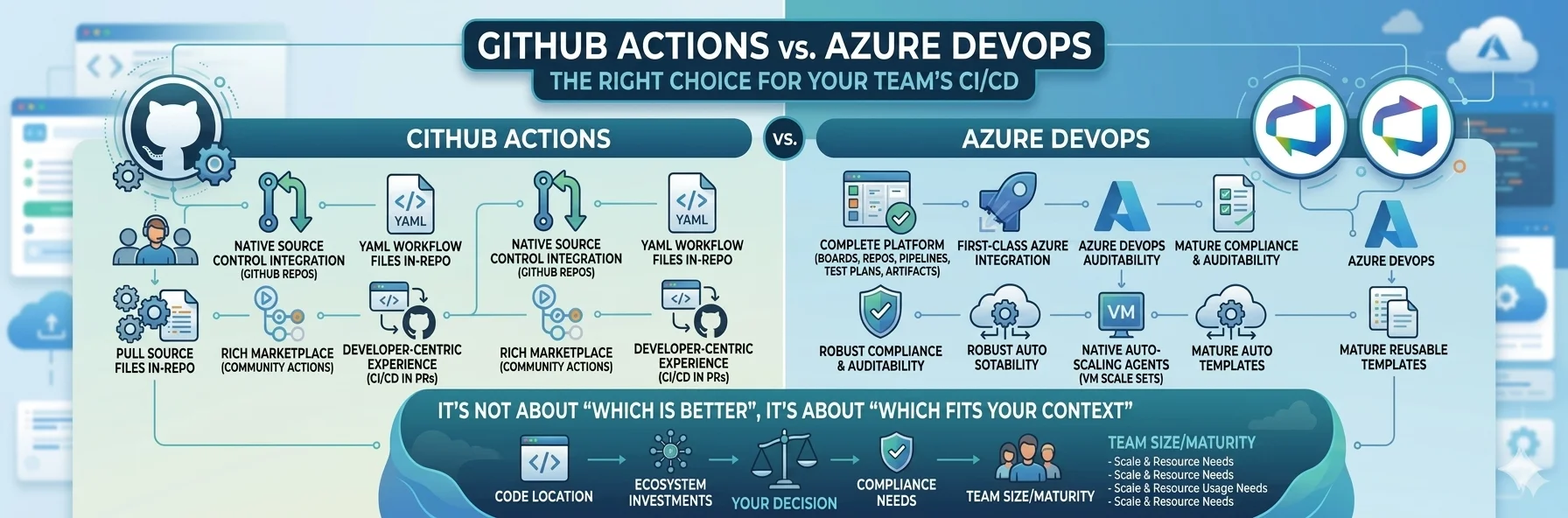
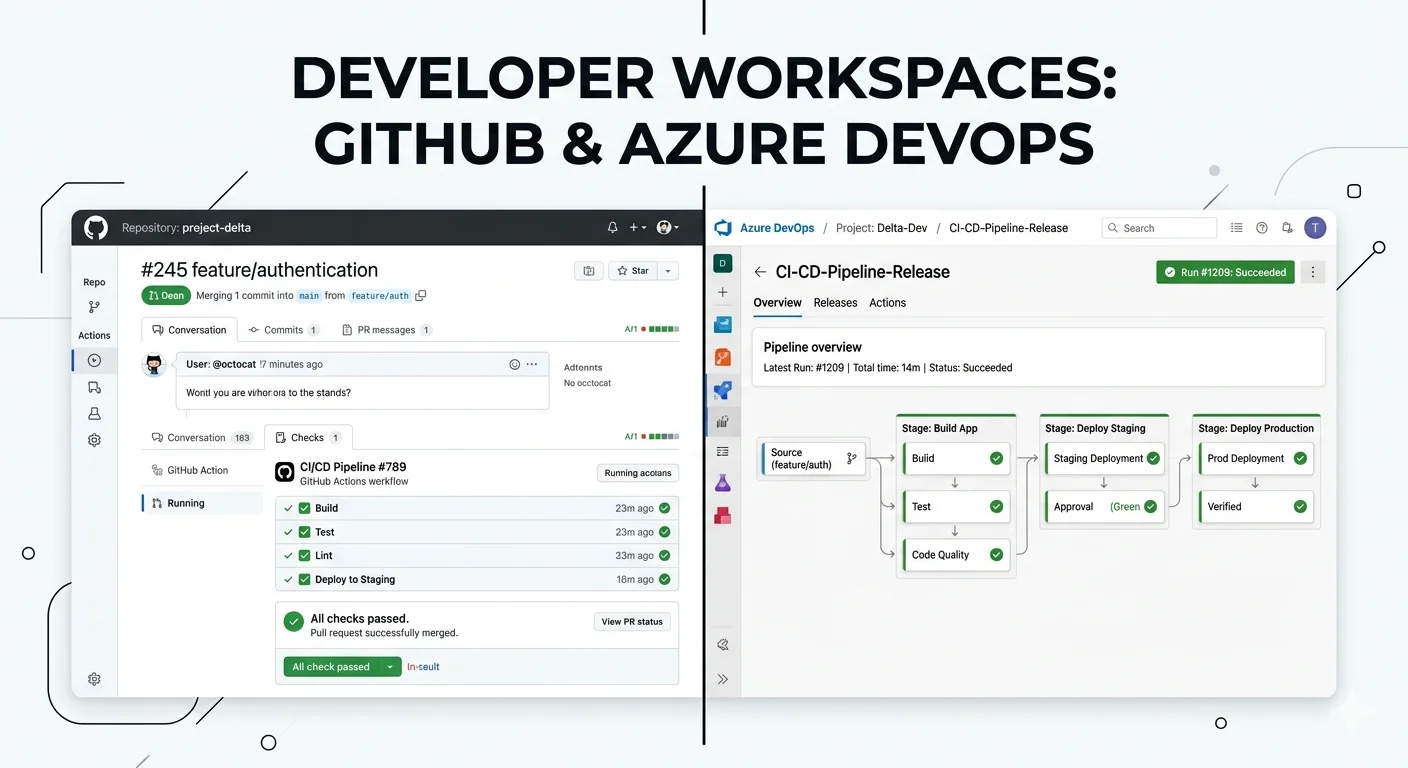
Azure DevOps is a complete software development lifecycle platform
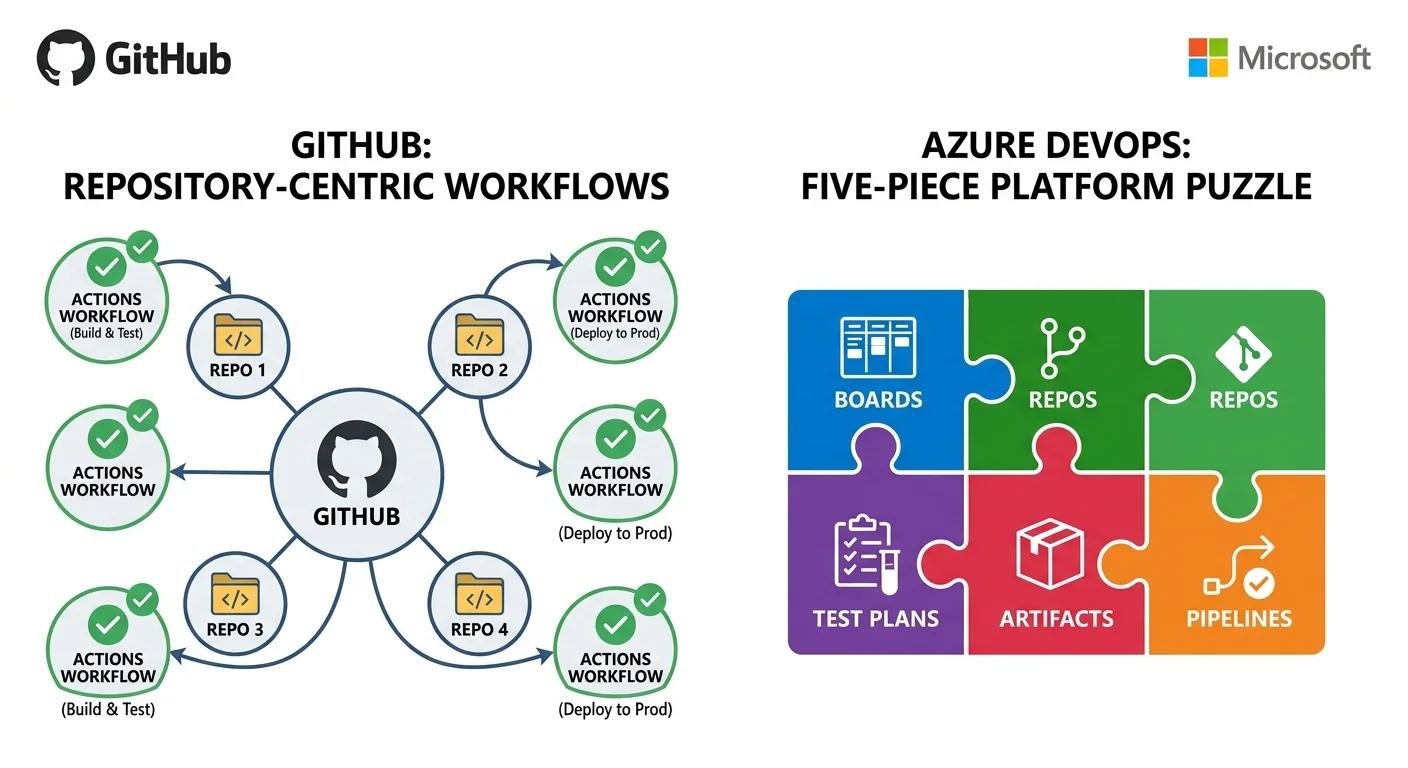
It contains five distinct services that work together as one platform.
- Azure Boards: project management, sprint planning and work item tracking
- Azure Repos: Git repository hosting and code review
- Azure Pipelines: CI/CD automation for building, testing and deploying
- Azure Test Plans: structured and exploratory testing management
- Azure Artifacts: private package feed for NuGet, npm, Maven and Python
GitHub Actions is not a standalone product
It is a CI/CD automation platform built directly into GitHub. You cannot use GitHub Actions without GitHub. If your code is in GitHub then Actions is available to you as part of the repository experience. Workflows are defined as YAML files stored in the repository under the .github/workflows directory and triggered by repository events.
That fundamental structural difference, one is a standalone platform and one is embedded in a source control host, is the first thing that shapes the decision and it is the thing that most comparison posts skip over entirely.
The Source Control Question Is the First Filter
The very first thing I ask when helping an organization make this decision is where does your code live today and where do you want it to live in two years? This single question eliminates a significant amount of confusion before it starts.
If your code is in GitHub
- Pull request checks show Actions status inline without navigating to a separate system
- Deployment environments are linked directly to repository environments
- Secrets are scoped at the repository or organization level natively
- Developers see build status where they already spend their time reviewing code
- The Actions tab is part of the same interface as issues, pull requests and releases
If your code is in Azure Repos
- Branch policies can require a pipeline to pass before a pull request merges
- Pipeline triggers are natively scoped to specific branches and path patterns
- Work items in Azure Boards link automatically to pipeline runs and commits
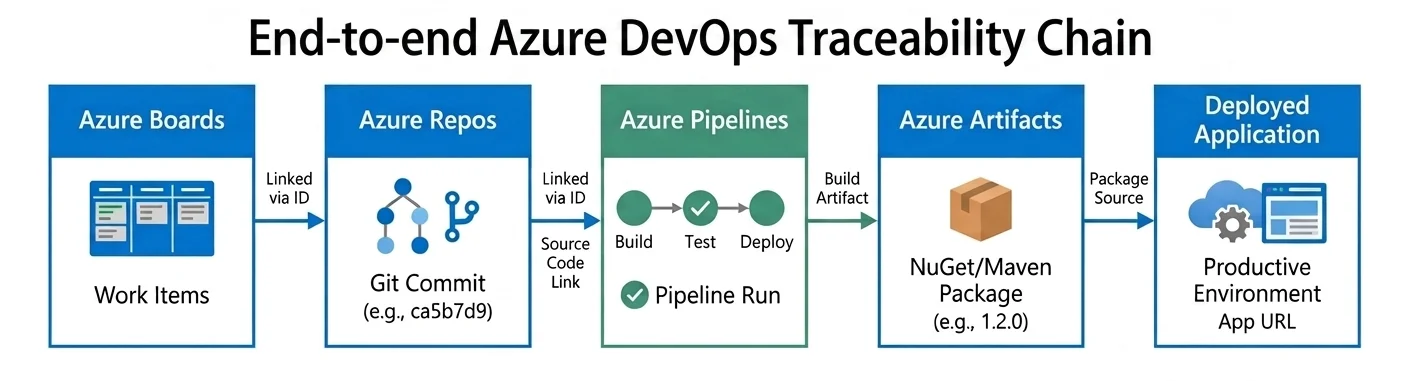
- The complete chain from business requirement to deployed artifact lives in one platform
- Compliance and audit trails span Boards, Repos, Pipelines and Artifacts without custom tooling
If your code is somewhere else entirely
If your repositories live on a self hosted GitLab, a Bitbucket instance or a legacy system that nobody has gotten around to migrating, you are in more complex territory and neither tool gives you its best experience without additional integration work. Both can connect to external repositories but you lose the native integration that makes each tool compelling in the first place.
The uncomfortable reality for enterprise organizations with mixed source control is that you will probably end up running both tools simultaneously. I know that is not the clean single-platform answer that architecture committees prefer but it is the honest answer. Forcing everything through one CI/CD tool when the source control is split creates integration overhead that is almost always higher than the operational cost of maintaining two platforms.
The Microsoft Azure Ecosystem Factor
Beyond source control the second major factor is how deeply embedded your organization is in the Microsoft Azure ecosystem. This one is specifically relevant for organizations running significant workloads on Azure and matters more than most people account for at decision time.
Azure DevOps native Azure integration
- Service connections are built around Azure subscriptions and Entra ID natively
- Workload identity federation eliminates client secrets from service connections entirely
- Azure CLI, ARM template deployment, AKS and App Service tasks are maintained by Microsoft
- New Azure services get Azure DevOps task support relatively quickly after launch
- The management interface for service connections is a platform level concept with governance built in
- Audit logs integrate directly with Log Analytics Workspace and Azure Sentinel
GitHub Actions Azure integration
- Official Microsoft maintained actions cover login, AKS context, web app deployment and more
- Workload identity federation works with GitHub Actions through OIDC
- Azure authentication is handled through workflow steps rather than platform level service connections
- Integration requires more manual configuration compared to the Azure DevOps native model
- The experience feels less native for teams already working extensively in the Azure portal
The Marketplace and Third Party Integration Story
Why the GitHub Actions marketplace matters
- Tens of thousands of actions contributed by the community, tool vendors and Microsoft
- New DevOps tools almost always publish a GitHub Action before any other integration
- Security scanners, quality tools, cloud providers and deployment platforms all have actions
- Open source projects write their own Actions workflows which become reference implementations for everyone
- Integrating a third party tool is typically faster through GitHub Actions than Azure DevOps
Self Hosted Runners and Agents: Where the Real Pain Lives
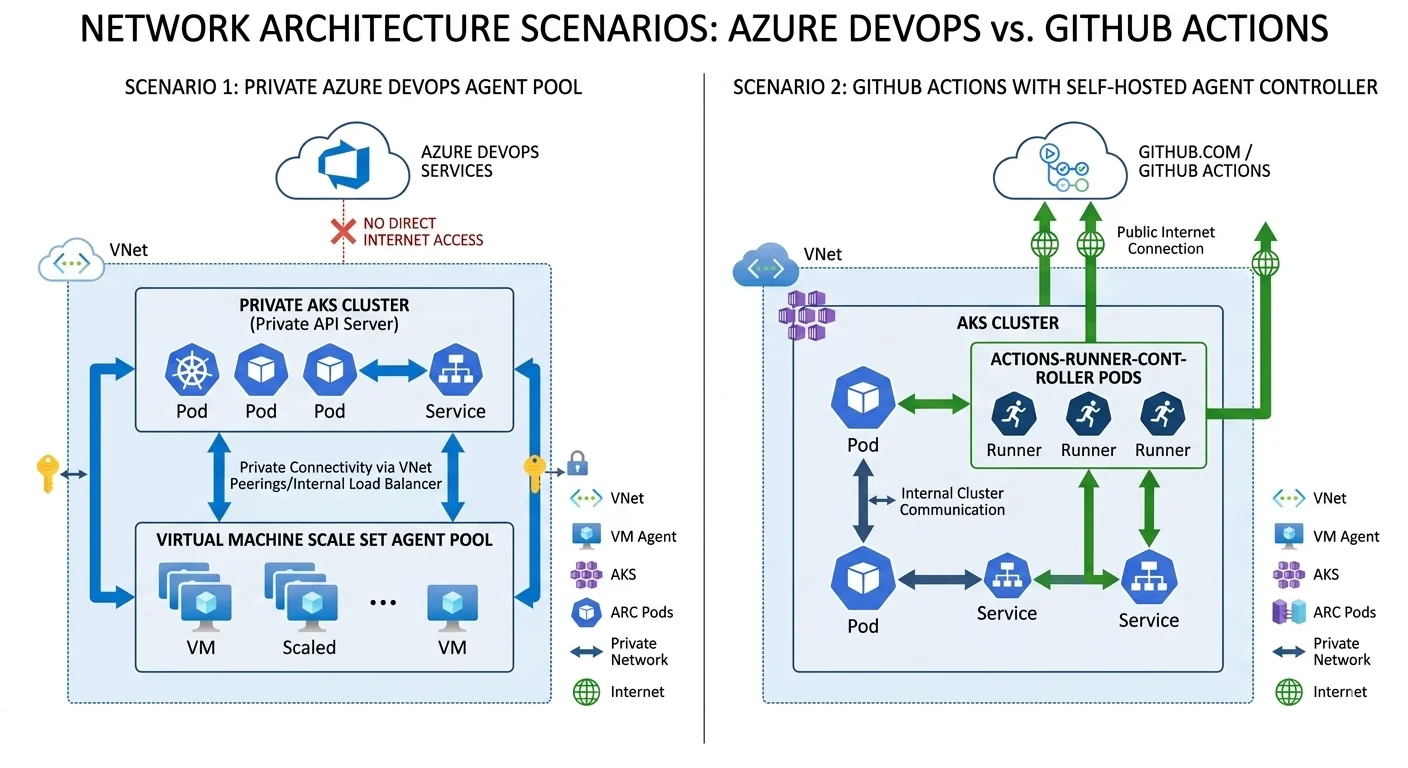
This is where I have seen the most practical pain in organizations trying to use either tool in complex network environments. Both platforms support running pipeline jobs on infrastructure you control rather than shared Microsoft or GitHub hosted machines. Azure DevOps calls them agents. GitHub Actions calls them runners. The concepts are equivalent but the operational model differs in ways that matter significantly at enterprise scale.
Azure DevOps scale set agents
- Native integration with Azure Virtual Machine Scale Sets for elastic agent pools
- Azure DevOps manages scaling automatically based on queue depth
- Scales up when jobs are queued, scales down during idle periods to reduce cost
- Agents inside a VNet can reach private AKS API servers, private endpoints and internal resources
- No additional tooling or infrastructure management required beyond the scale set itself
- The model I use for every private AKS cluster deployment where agents must be inside the network
GitHub Actions self hosted runners
- No native equivalent to the Azure DevOps scale set agent model
- Auto-scaling requires additional tooling such as actions-runner-controller on Kubernetes
- actions-runner-controller runs runners as pods inside an AKS cluster inheriting its network access
- Requires Kubernetes operational maturity that not every team has
- Third party services exist that wrap the GitHub runner API for scaling but add cost and complexity
- For simple scenarios self hosted runners on static VMs work fine but do not scale elegantly
Pipeline as Code: The Developer Experience Difference
Both platforms use YAML based pipeline definitions stored in the repository. But the template and reuse models differ in ways that become increasingly important as the number of teams and services grows.
GitHub Actions reusable workflows
- Workflows stored in .github/workflows directory alongside application code
- Reusable workflows can be referenced across repositories within the same organization
- The event trigger model is rich covering push, pull request, release, schedule and dispatch events
- Works naturally for teams where deployment automation is tightly coupled to the code it deploys
- Cross-repository workflow reuse exists but the pattern is less mature than Azure DevOps templates
- Tooling for managing and versioning shared workflows at enterprise scale is still developing
Azure DevOps pipeline templates
- Pipelines can reference templates stored in completely separate repositories
- A central infrastructure repository can define the standard pipeline structure for the entire organization
- Individual service teams reference the shared template and override only service-specific values
- Template parameters are strongly typed with validation at pipeline queue time
- The pattern scales well across hundreds of services owned by many different teams
- Changes to the shared template propagate to all pipelines referencing it on next run
Security, Compliance and Audit Requirements
Security and compliance requirements are the lens that sometimes overrides all the other considerations and produces a clear answer regardless of what the engineering team's technical preferences might be. This section matters more than any other for organizations in regulated industries.
What regulated industries typically require
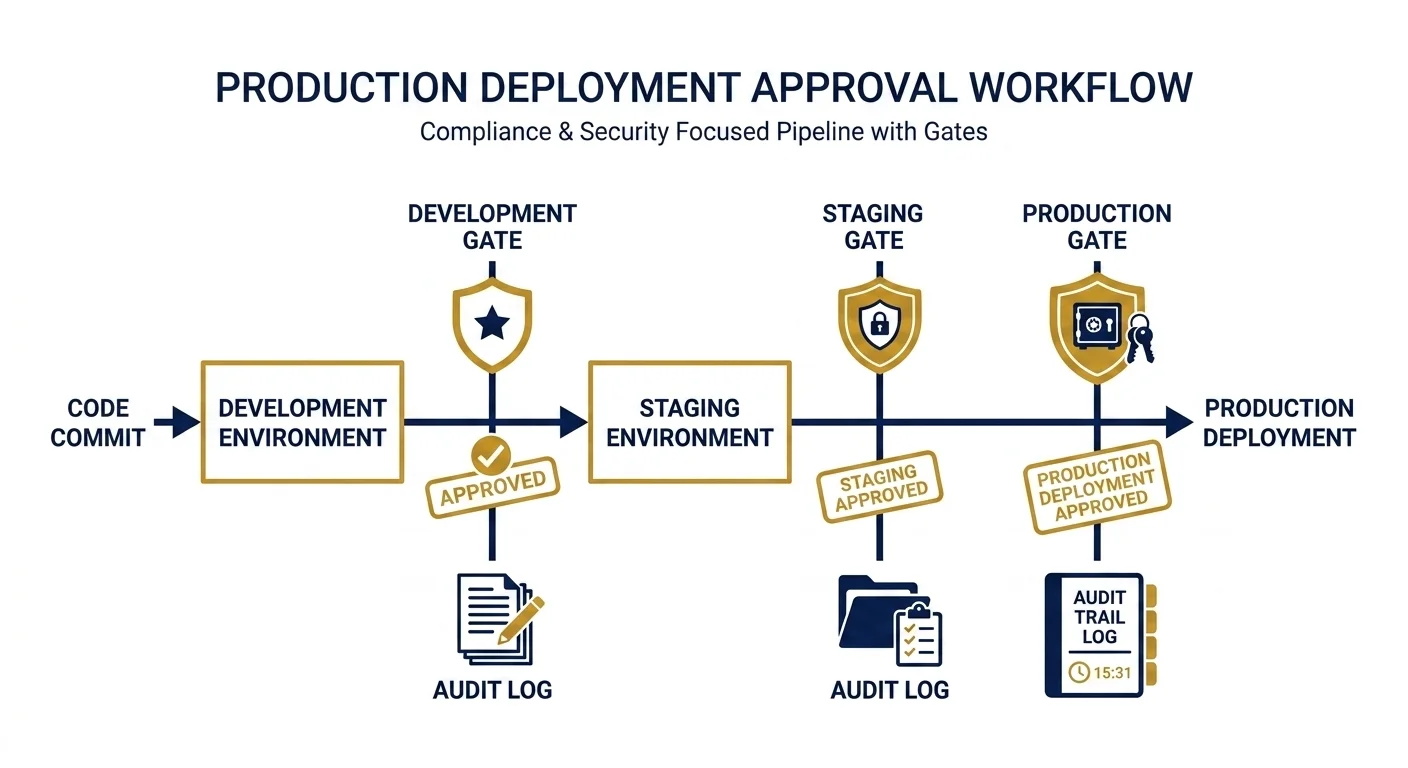
- Full audit trail of who approved each deployment and when
- Evidence of what code was included in each deployed artifact
- Proof that testing ran against the artifact before production deployment
- Confirmation that pre-production environment deployment preceded production
- Immutable artifact versioning so deployed packages cannot be modified after the fact
- Integration with SIEM and security monitoring platforms for deployment activity
- Separation of duties between who can create a pipeline and who can approve a production deployment
Azure DevOps compliance story
- Azure Boards to Repos to Pipelines to Artifacts chain provides complete traceability natively
- Environment approval gates record the approver identity and timestamp permanently
- Audit log exports to Log Analytics Workspace and integrates with Azure Sentinel
- Service connection governance is a platform level concept with its own RBAC model
- Immutable packages in Azure Artifacts with promotion gates between feeds
- Built for enterprise compliance requirements from relatively early in the platform's development
- Speaks the same language as Azure security and compliance tooling already in use
GitHub Actions compliance story
- Deployment environments with required reviewers provide approval gates
- Deployment protection rules can enforce pre-production environment sequencing
- GitHub Advanced Security adds code scanning and secret scanning to the compliance picture
- Audit log available through the GitHub organization audit log API
- For many compliance frameworks the GitHub model is now sufficient
- Less naturally integrated with Azure Sentinel and Log Analytics compared to Azure DevOps
- Better suited for organizations whose compliance tooling is not Azure ecosystem specific
Pricing: What Nobody Tells You Upfront
Pricing is context dependent and changes frequently enough that specific numbers become outdated quickly, but the pricing model differences are worth understanding because they affect the decision differently at different organization sizes.
GitHub Actions pricing model
- Free tier includes 2000 minutes per month for private repositories on the Free plan
- GitHub Team and Enterprise plans include more included minutes
- Pricing is per minute of compute time on Microsoft or GitHub hosted runners
- Self hosted runners have no per-minute charge but you pay for the underlying infrastructure
- Storage for artifacts and packages counts against the included storage allowance
- For open source public repositories Actions minutes are completely free
- Cost scales with usage making it predictable for steady workloads and variable for bursty ones
Azure DevOps pricing model
- One free Microsoft hosted parallel job included with limited minutes
- Additional parallel jobs purchased at a flat monthly rate regardless of usage
- Self hosted agents are free for unlimited minutes with no parallel job limit on the free tier
- Azure Artifacts includes a free storage tier with charges beyond the included amount
- Stakeholder access to Azure Boards is free for unlimited users
- For organizations with many pipelines running in parallel the parallel job model can become expensive
- For organizations running primarily on self hosted agents the cost model is very favorable
The Enterprise Decision Framework
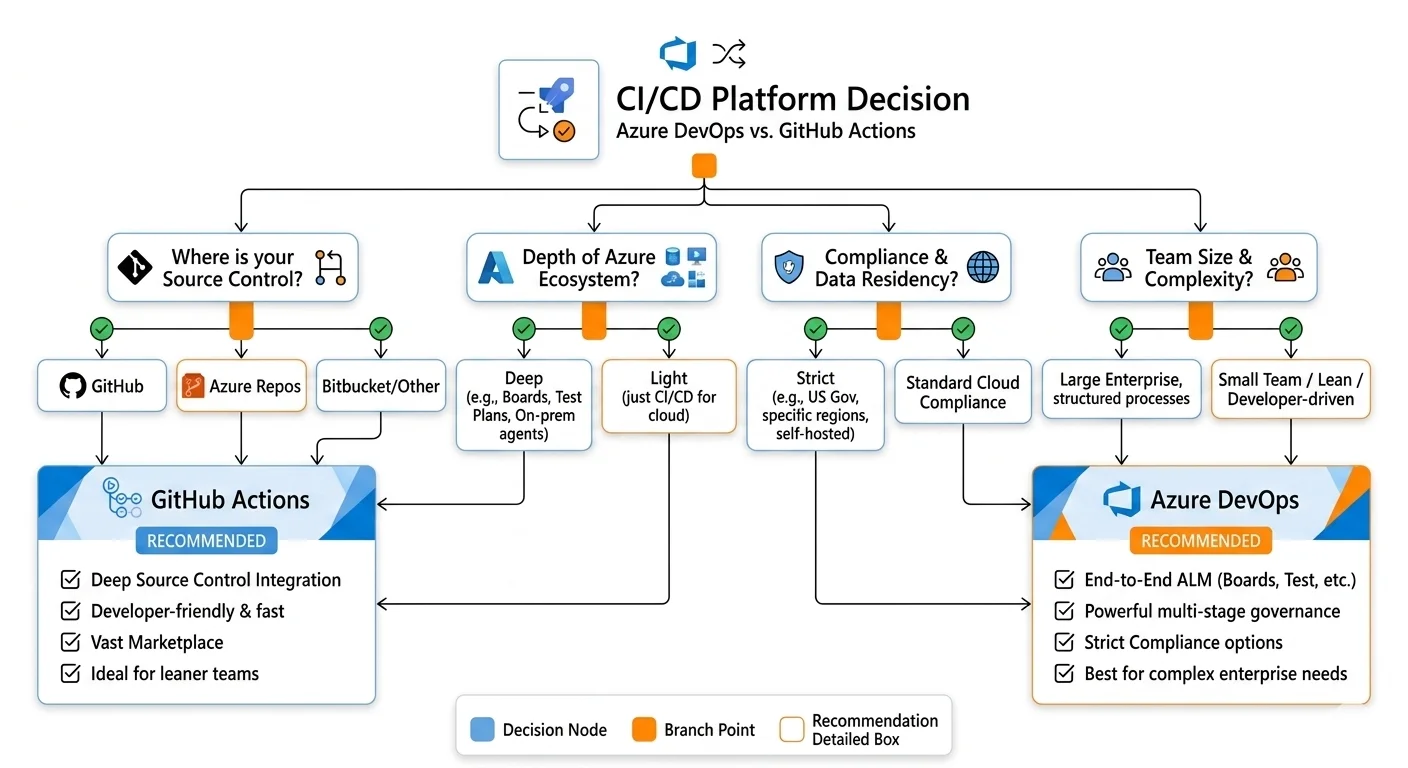
Having laid out the landscape let me be direct about the framework I actually use when helping an enterprise make this decision. These are the questions I ask in order and the answers that drive me towards each tool.
Questions that point towards GitHub Actions
- Is your code already in GitHub and unlikely to move?
- Does your team value marketplace breadth and third party integration speed?
- Are you not heavily invested in Azure Boards, Azure Test Plans or Azure Artifacts?
- Is your compliance tooling not Azure ecosystem specific?
- Do you have Kubernetes operational maturity for runner infrastructure if private network access is needed?
- Is developer experience and keeping CI/CD close to the code a high priority?
Questions that suggest running both
- Do you have code split across GitHub and Azure Repos with no near-term plan to consolidate?
- Have you recently acquired a company with a different toolchain?
- Do different teams in your organization have fundamentally different deployment patterns?
- Would forcing consolidation onto one tool require migrations that create more risk than value?
What the Decision Actually Looks Like in Practice
Let me give you concrete scenarios that represent the real situations I encounter most frequently, because abstract frameworks only go so far.
Scenario 1: A startup building a SaaS product on Azure
Code is in GitHub because that is where modern teams start. Team is small, moving fast, using a mix of Azure services and third party tools. No existing investment in Azure DevOps.
In this scenario GitHub Actions is the clear choice. The marketplace breadth covers the third party tools they need. The developer experience of having CI/CD in the same interface as code review is a genuine productivity advantage for a small team. The pricing model works well at this scale. The compliance requirements are not yet the complexity that would push them towards Azure DevOps. They can always migrate later if the requirements change and in my experience the migration is not as painful as organizations fear when the pipelines are well structured.
Scenario 2: A large enterprise with a legacy Azure DevOps investment
Organization has been using Azure DevOps for five years. Azure Boards runs all sprint planning. Azure Artifacts hosts all internal packages. Azure Repos hosts most of the codebase although a few teams have GitHub repositories. They are asking whether to standardize on GitHub Actions.
In this scenario I tell them not to migrate. They have built significant organizational value in the Azure DevOps traceability chain and compliance tooling. The migration cost of moving boards, repos and artifacts alongside pipelines is enormous and the benefit is unclear. What I would suggest instead is evaluating whether the GitHub repositories can move to Azure Repos, which removes the mixed tooling problem, or accepting that those specific repositories use GitHub Actions while the majority of the platform remains on Azure DevOps.
Scenario 3: A financial services firm building a new platform
Greenfield platform. Regulated industry. Strict audit requirements. Deploying primarily to Azure. Team has no strong existing preference.
In this scenario Azure DevOps is the right choice. The compliance traceability chain, the native Azure integration, the approval gate model and the Log Analytics audit log export all align with what the compliance team needs. The self hosted scale set agents give them the private network access they need for their private AKS clusters without additional Kubernetes infrastructure. Starting with the tool that aligns with their compliance requirements is far easier than migrating to it after the platform is running.
The Thing That Matters More Than the Tool Choice
There is one more thing worth saying that most comparison posts do not address directly. Whichever tool you choose, the quality of your pipelines is determined far more by the engineering discipline you apply to them than by which platform you chose.
I have seen catastrophically bad Azure DevOps pipelines and beautifully engineered GitHub Actions workflows and the reverse of both. The discipline of treating pipeline code with the same rigor as application code is what separates CI/CD platforms that teams trust from platforms that teams work around.
The engineering discipline that makes either tool work
- Review pipeline changes in pull requests the same way you review application code
- Test pipeline changes in lower environments before promoting to production pipelines
- Pin dependency versions to specific commit SHAs not mutable tags like v2 or latest
- Document non-obvious pipeline decisions inline with comments explaining the why not just the what
- Refactor pipelines when they accumulate technical debt rather than patching around it
- Treat secrets management with the same rigor as secrets management in application code
- Monitor pipeline performance and failure rates as operational metrics not afterthoughts
- Keep pipelines simple enough that a new team member can understand them without asking for help